With remote work, cloud servers, and personal devices, employees, developers, and vendors need access to company systems. However, giving everyone the same access can create security risks. A stolen password or infected device can expose important business data.
This is why businesses use Zero Trust Network Access (ZTNA). It checks every user and device before granting access and limits permissions to necessary resources. According to the 2026 Verizon Data Breach Investigations Report, vulnerability exploitation caused 31% of reported breaches. This highlights the need for stronger access security.
Let’s look at how ZTNA works, what makes it different, and which solutions businesses can consider.
What is Zero Trust Network Access? Why are businesses adopting it?
Zero Trust Network Access (ZTNA) is a security approach that checks a user’s identity and device before allowing access to private business applications.
Its main rule is simple: Never trust automatically. Always verify.
Unlike traditional Virtual Private Networks (VPNs), ZTNA does not give users access to an entire company network. It connects them only to the applications they are allowed to use.
For example, an HR employee may need access to payroll software but not the company’s financial database. ZTNA gives access to the required application without opening other parts of the network.
According to NIST Special Publication 800-207, Zero Trust removes automatic trust based on network location or device ownership.
This approach is useful for businesses with remote teams, cloud applications, contractors, and multiple office locations.
How does ZTNA work? Follow these 6 simple steps

ZTNA checks users and devices before creating a secure connection to business applications. Here is how the process works:
Step 1 – User Login: The employee enters their login details. Multi-Factor Authentication (MFA) may provide an additional security check.
Step 2 – Device Check: The system checks whether the device has updated software, antivirus protection, and required security settings.
Step 3 – Access Review: It checks the user’s role, requested application, location, and other security conditions.
Step 4 – Permission Approval: If the request meets security rules, the user receives access to the approved application.
Step 5 – Secure Connection: ZTNA creates a protected connection between the user and the application without exposing the wider network.
Step 6 – Activity Monitoring: The system monitors access and can restrict a session if it detects suspicious activity or a change in security conditions.
Example: An external accountant needs access to a company’s financial reporting software. ZTNA checks the accountant’s identity and device before allowing access to that application. Other company systems remain restricted.
ZTNA vs. VPN vs. SASE vs. SDP – What makes them different?
These technologies help businesses secure network access, but they serve different purposes.
| Technology | Main purpose | How it works | Best for |
|---|---|---|---|
| ZTNA | Secure application access | Verifies users and devices before granting access | Remote employees and vendors |
| VPN | Secure network connection | Creates an encrypted tunnel to a private network | Connecting to internal resources |
| SASE | Combined network and security | Brings networking and security services together | Large, distributed businesses |
| SDP | Controlled network access | Creates a protected boundary around approved resources | Isolated application access |
The main difference: Zero Trust Network Access protects access to individual applications, VPN connects users to a network, SASE combines multiple security and networking services, and SDP controls who can see and access network resources.
A business may use more than one of these technologies depending on its security needs.
6 core principles that make ZTNA more secure
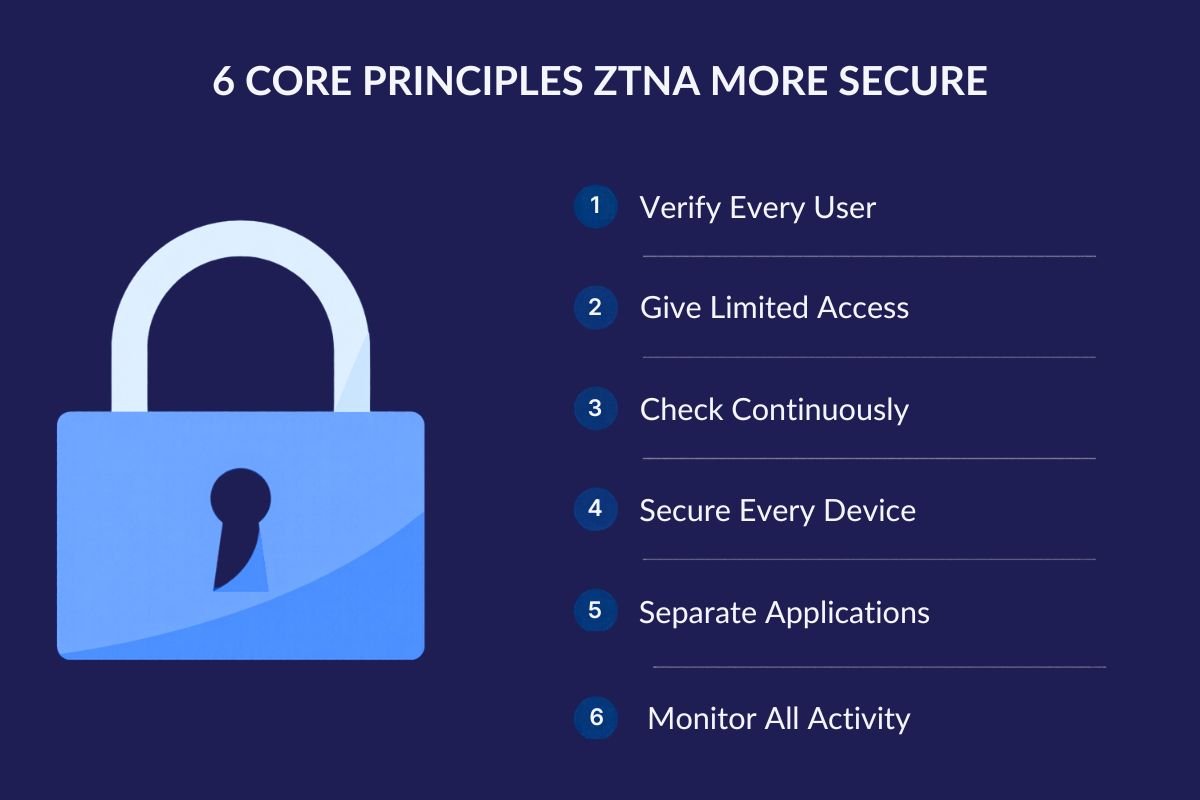
ZTNA follows six important principles to protect business applications.
- Verify Every User: Check every login request instead of trusting users automatically.
- Give Limited Access: Allow employees to use only the applications required for their jobs.
- Check Continuously: Review access conditions even after a user logs in.
- Secure Every Device: Check device health, software updates, and security settings before granting access.
- Separate Applications: Keep applications isolated so that a compromised account cannot easily reach other systems.
- Monitor All Activity: Track access and data movement to identify unusual behaviour.
ZTNA 1.0 vs. ZTNA 2.0 – How has security changed?
Zero Trust Network Access has evolved as businesses need stronger protection beyond basic login checks. ZTNA 1.0 and ZTNA 2.0 are industry terms commonly used to explain this development, particularly by Palo Alto Networks. They are not official NIST versions.
| Feature | ZTNA 1.0 | ZTNA 2.0 |
|---|---|---|
| Access checks | Mainly at login | Continuous verification |
| Permissions | Basic application access | More detailed access controls |
| Traffic checks | Limited inspection | Continuous traffic inspection |
| Data security | Basic protection | Stronger DLP integration |
| Threat detection | Limited monitoring | Improved threat detection |
| Application coverage | Mainly private applications | Private, SaaS, and cloud applications |
Why does this matter?
Imagine an employee logs in using valid credentials, but their device becomes infected with malware during the session.
A basic access model may not immediately identify the problem. An advanced ZTNA approach can reassess the session and restrict access when it detects a security risk.
The focus is no longer just on who enters the network but also on what happens after access is granted.
Benefits and challenges of ZTNA – Is it worth the investment?
ZTNA gives businesses better control over application access. However, its implementation also comes with a few challenges.
Benefits of ZTNA
- Better Network Security: Limits access to approved applications and reduces unnecessary exposure.
- Safer Remote Work: Employees can access business applications from different locations.
- Reduced Security Risks: Application-level access makes it harder for attackers to move between systems.
- Better Access Control: IT teams can manage employee and vendor permissions from a central platform.
- Improved Visibility: Businesses can monitor user activity and identify unusual access requests.
- Data Protection: Integration with security tools helps protect sensitive business information.
IBM’s 2025 Cost of a Data Breach Report reported a global average data breach cost of $4.44 million. Strong access controls can help reduce exposure, although they cannot prevent every breach.
Challenges of ZTNA
- High Initial Costs: Licensing, setup, and employee training can increase expenses.
- Complex Setup: Replacing existing VPN systems and setting access rules takes time.
- Legacy System Issues: Older applications may not work smoothly with modern ZTNA solutions.
- User Experience: Frequent security checks can interrupt employee workflows.
- Regular Monitoring: IT teams need to review access policies and security alerts regularly.
Businesses should start with critical applications and expand ZTNA gradually.
Top 5 ZTNA solutions: Which one fits your business?

Several cybersecurity companies offer Zero Trust Network Access solutions. Each platform has different features and works best for different business needs.
| Solution | Best for | Deployment | Standout feature |
|---|---|---|---|
| Zscaler Private Access | Large enterprises | Cloud-delivered | Application-level access |
| Palo Alto Prisma Access | Advanced enterprise security | Cloud-delivered | Threat prevention and DLP |
| Cloudflare Zero Trust | Startups and developers | Cloud-based | Identity-based application access |
| Netskope One Private Access | Data-focused businesses | Cloud-delivered | Integrated data protection |
| Cisco Secure Access | Large network environments | Cloud-based and hybrid | Centralized security policies |
1. Zscaler Private Access: Zscaler Private Access provides secure access to private applications without exposing the entire company network. It is useful for large businesses with remote employees and multiple locations.
2. Palo Alto Prisma Access: Prisma Access combines ZTNA with network security services. It offers threat prevention, traffic inspection, and data protection features for businesses with advanced security needs.
3. Cloudflare Zero Trust: Cloudflare Zero Trust helps businesses control access to internal applications using identity-based security policies. Its cloud infrastructure makes it useful for distributed teams and developers.
4. Netskope One Private Access: Netskope provides secure access to private applications with device checks and data protection features. It is suitable for organizations managing sensitive information across cloud and private environments.
5. Cisco Secure Access: Cisco Secure Access combines application access controls with cloud-delivered security services. It supports businesses that need centralized security management across complex network environments.
Choosing the right solution: Check application compatibility, pricing, user capacity, device support, integration options, and security features before selecting a platform.
Where does ZTNA work best and what mistakes should businesses avoid?
ZTNA helps businesses protect applications while giving employees, vendors, and partners controlled access. It is useful for remote teams, cloud applications, banking, healthcare, IT operations, and business mergers. Employees can access the tools they need without opening the entire company network.
However, businesses must avoid common mistakes such as giving too many permissions, ignoring device security, overlooking older applications, depending only on ZTNA, and skipping regular access reviews. Clear access rules, device checks, and regular monitoring help businesses get the best results from ZTNA.
Conclusion
Zero Trust Network Access (ZTNA) helps businesses protect their applications and data by checking users and devices before allowing access. It gives better control over who can access important resources.
As remote work and cyber threats grow, traditional security is not enough. With clear access rules, regular monitoring, and the right tools, businesses can use ZTNA to build a safer and stronger security system.
FAQs
1. Does Zero Trust Network Access replace VPN?
ZTNA can replace VPN for application access, but VPN may still be needed for legacy systems and network connections.
2. Is ZTNA the same as Zero Trust?
No, Zero Trust is a broader security approach, while ZTNA applies its principles to secure application access.
3. How much does ZTNA cost?
Zero Trust Network Access pricing depends on the provider, number of users, features, deployment, and maintenance requirements.