Accounts Receivable Automation streamlines the invoice-to-cash process by automating invoicing, payment reminders, collections, payment matching, and reporting. It helps businesses improve cash flow, reduce Days Sales Outstanding (DSO), minimize manual work, and enhance customer communication through AI-powered workflows. By integrating with ERP and accounting systems, AR automation enables finance teams to collect payments faster and make smarter, data-driven financial decisions.
Accounts receivable (AR) automation helps businesses collect payments faster by automating the entire invoice-to-cash process. Instead of relying on spreadsheets, manual reminders, and payment matching, finance teams use AI-powered workflows to send invoices, track payments, follow up on overdue accounts, and automatically reconcile transactions.
Manual AR processes often lead to delayed collections, missed invoices, and increased administrative work. AR automation reduces these issues by improving accuracy, speeding up cash flow, and providing real-time visibility into outstanding invoices. As a result, finance teams spend less time on repetitive tasks and more time supporting business growth.
Whether you’re a small business or a large enterprise, accounts receivable automation creates a faster, more scalable, and data-driven collections process while delivering a better payment experience for customers.
What is accounts receivable automation?
Accounts receivable (AR) automation is software that automates invoicing, payment reminders, collections, payment matching, and reporting. It helps businesses reduce manual work, improve collection efficiency, lower Days Sales Outstanding (DSO), and speed up cash flow with real-time tracking and AI-driven insights.
Unlike manual AR processes that rely on spreadsheets and follow-ups, AR automation automatically sends reminders, matches payments, reconciles transactions, and gives finance teams complete visibility into outstanding invoices and customer payment behavior.
Why organizations are shifting to AR automation
Businesses handle growing invoice volumes, multiple payment methods, and customers across different regions. Manual accounts receivable processes are often slow, error-prone, and difficult to scale.
Accounts receivable automation solves these challenges by automating the entire invoice-to-cash process. It reduces late payments, improves cash flow, lowers administrative costs, and enables finance teams to focus on higher-value work instead of repetitive collection tasks.
A report by PYMNTS reveals that businesses using AR automation experience a 32% reduction in Days Sales Outstanding (DSO) within the first six months of implementation.
Strategic benefits of modernizing AR
- Accelerate cash inflows and reduce payment delays
- Shorten Days Sales Outstanding (DSO)
- Automate the delivery of bills and reminders
- Ensure consistent follow-ups across the client base
- Eliminate manual effort in bank reconciliation
- Reduce billing discrepancies and redundant communications
- Access real-time dashboards for outstanding debt
- Enhance the digital payment experience for customers
- Leverage AI for deeper collection insights
- Scale finance operations efficiently as the business grows
As organizations continue investing in digital finance transformation, AR automation has become an essential component of modern finance operations rather than simply another productivity tool.
Expert Insight: High-performing finance teams increasingly treat accounts receivable automation as a working capital optimization strategy, using payment data and predictive analytics to improve liquidity rather than only automating routine tasks.
How automated receivables work
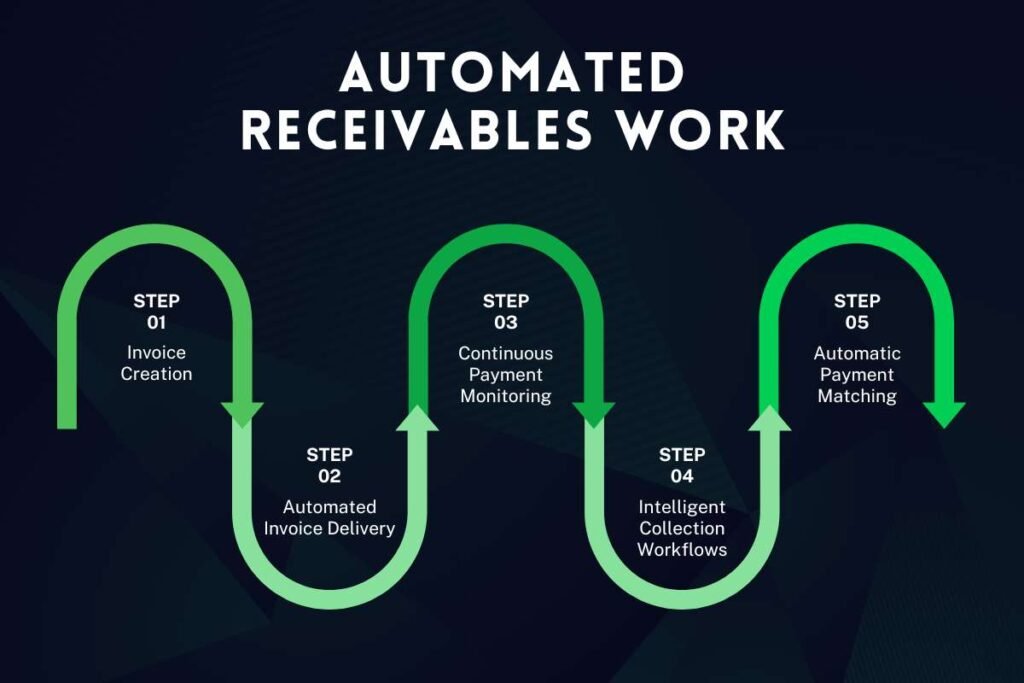
Accounts receivable automation manages the entire invoice-to-cash process automatically. It creates invoices, tracks payment due dates, sends reminders, matches incoming payments, and updates records in real time. By replacing manual tracking and spreadsheets, it speeds up collections, reduces errors, and improves cash flow.
Step 1: Invoice creation
The process begins once goods are delivered or services are completed.
The AR platform automatically generates invoices using data from connected business systems such as:
- ERP software
- Accounting platforms
- CRM systems
- Order management software
This eliminates manual data entry and reduces billing errors.
Example: When a sales order is completed in an ERP system, the invoice is automatically created without requiring additional finance team intervention.
Step 2: Automated invoice delivery
Once generated, invoices are delivered immediately through the customer’s preferred communication channel.
Common delivery methods include:
- Customer self-service portals
- Electronic Data Interchange (EDI)
- Mobile applications
- Supplier or procurement networks
Many platforms also confirm whether an invoice has been delivered or opened, allowing finance teams to identify communication issues early.
Business Benefit: Faster invoice delivery shortens the payment cycle because customers receive invoices immediately after billing.
Step 3: Continuous payment monitoring
After invoices are sent, the automation platform tracks payment activity in real time.
Finance teams can monitor:
- Invoice status
- Due dates
- Outstanding balances
- Partial payments
- Customer credit limits
- Payment history
- Collection status
Instead of manually checking dozens or hundreds of invoices, dashboards provide a complete overview of receivables from a single interface.
Step 4: Intelligent collection workflows
One of the biggest advantages of AR automation is that it automatically initiates collection activities when payment milestones are reached.
For example, the software can:
- Send reminder emails before due dates
- Notify customers of payment deadlines
- Escalate overdue invoices
- Assign high-risk accounts to collection specialists
- Pause reminders during invoice disputes
- Trigger personalized collection sequences
These automated workflows ensure every customer receives timely communication without requiring manual intervention.
In the next section, we’ll explore Programmatic Dunning Triggers in detail and see how AI uses customer payment behavior to improve collection success while maintaining positive customer relationships.
Step 5: Automatic payment matching
When payments are received, the software automatically matches transactions with the correct invoices.
Instead of manually reconciling bank statements against invoices, intelligent matching algorithms compare:
- Invoice numbers
- Payment references
- Customer details
- Payment amounts
- Transaction dates
Automatic reconciliation significantly reduces processing time while minimizing accounting errors.
Step 6: Analytics and performance reporting
Every payment and collection activity generates valuable financial data.
AR automation platforms provide dashboards that help finance teams monitor key performance indicators (KPIs), including:
| KPI | Why It Matters |
| Days Sales Outstanding (DSO) | Measures how quickly customers pay invoices |
| Collection Effectiveness Index (CEI) | Evaluates collection performance |
| Average Payment Time | Tracks customer payment behavior |
| Aging Reports | Identifies overdue invoices |
| Cash Flow Forecasts | Predicts future incoming payments |
| Dispute Resolution Time | Measures how quickly payment issues are resolved |
A global manufacturing firm implemented automated AR workflows and reported a 50% decrease in manual reconciliation tasks and a 20% improvement in cash flow accuracy within one year.
These insights help finance leaders identify trends, improve collection strategies, and make informed decisions based on real-time data rather than historical reports.
The role of programmatic dunning triggers
Dunning triggers are rule-based workflows that automatically prompt customers to settle balances. By using specific events like an upcoming due date or a missed payment, these triggers ensure consistent communication without requiring a team member to draft every email manually.
By shifting away from static spreadsheets, businesses can use these automated sequences to improve recovery rates. This process maintains a professional tone while ensuring that high-risk or significantly overdue accounts are escalated to the finance team immediately.
Functional workflow of dunning triggers
Instead of sending the same reminder to every customer, modern AR platforms evaluate invoice status, payment history, customer risk, and business rules before initiating collection activities.
| Trigger Event | Automated Action | Business Benefit |
| Invoice Created | Send invoice with secure payment link | Speeds up invoice delivery |
| 7 Days Before Due Date | Friendly reminder email | Prevents forgotten invoices |
| Due Date | Payment reminder via email or SMS | Encourages on-time payment |
| 5 Days Overdue | Second reminder with updated balance | Improves collection rates |
| Invoice Dispute Raised | Pause reminders and notify finance team | Prevents customer frustration |
| 15 Days Overdue | Assign account manager | Accelerates issue resolution |
| 30+ Days Overdue | Escalate to advanced collection workflow | Reduces bad debt risk |
This structured approach helps businesses maintain professional communication while minimizing manual intervention.
Enhancing collections with AI technology

Modern accounts receivable automation platforms go beyond rule-based workflows by incorporating Artificial Intelligence (AI) in accounting and machine learning to predict customer behavior, prioritize collections, and improve decision-making.
Instead of reacting after invoices become overdue, AI enables finance teams to take proactive action before payment delays occur.
1. Predictive payment timing
What is it?
Predictive payment timing uses historical payment data and AI models to estimate when customers are most likely to pay.
Instead of sending reminders on a fixed schedule, the system recommends the best time and communication channel for each customer.
How does it work?
The platform analyzes:
- Previous payment patterns
- Invoice values
- Seasonal trends
- Customer response history
- Industry payment cycles
- Preferred payment methods
Based on this analysis, reminders are sent when customers are most likely to respond.
Business Benefits
- Higher payment response rates
- Reduced Days Sales Outstanding (DSO)
- Fewer overdue invoices
- More efficient collection efforts
2. Dispute-aware logic
Invoice disputes are a common reason for delayed payments. Continuing to send reminders while a dispute is unresolved can damage customer relationships and create unnecessary confusion.
Dispute-aware logic automatically detects dispute status and adjusts collection workflows accordingly.
When a dispute is raised, the system can:
- Pause automated reminders.
- Notify finance or customer service teams.
- Assign the issue to the appropriate department.
- Resume collection workflows after the dispute is resolved.
For example, SAP and Oracle include dispute management features that help businesses track invoice issues, coordinate with internal teams, and resume collections only after the dispute is resolved.
This improves customer satisfaction while ensuring collections continue smoothly after resolution.
3. Behavioral customer segmentation
Every customer pays differently. Some consistently pay before the due date, while others require multiple reminders or frequently dispute invoices. Behavioral segmentation groups customers based on payment habits so businesses can tailor collection strategies accordingly.
Common customer groups
| Customer Type | Recommended Collection Strategy |
| Early Payers | Send invoice only |
| On-Time Customers | Friendly reminder before due date |
| Occasionally Late Payers | Reminder + follow-up email |
| Frequently Late Payers | Early escalation and proactive communication |
| High-Risk Accounts | Personalized collection strategy with account manager involvement |
For example, Serrala helps businesses automate collection strategies using predictive analytics.
Instead of applying one collection strategy to every customer, finance teams can deliver personalized communication that improves both payment success and customer relationships.
Understanding localized collection optimization

Localized collection optimization is the process of adapting payment reminders, payment methods, currencies, communication, and collection workflows to match each customer’s country, language, business culture, and local regulations. This helps businesses improve payment collection, reduce delays, and deliver a better customer experience in global markets.
Since payment preferences, banking systems, and compliance rules vary by region, a localized approach is more effective than using the same collection strategy everywhere.
Regional Preferences & Payment Channels: Customers are more likely to pay on time when businesses offer payment methods commonly used in their region.
| Country | Preferred Payment Channels |
| United States | ACH, Wire Transfers, Credit Cards |
| Germany | SEPA Credit Transfer |
| India | UPI, NEFT, RTGS |
| United Kingdom | Faster Payments |
Example: An Indian customer can pay instantly through a UPI link, while a German customer uses a SEPA bank transfer.
Multilingual Communication: Customers are more likely to respond when invoices and reminders are written in their preferred language.
Modern AR automation platforms automatically translate:
- Invoice notifications
- Payment reminders
- Collection emails
- Customer portal content
Local Compliance Support: Local payment rails are country-specific payment networks that allow customers to pay using trusted local banking systems.
| Country/Region | Local Payment Rail |
| India | UPI, NEFT, RTGS |
| European Union | SEPA |
| United States | ACH |
| United Kingdom | Faster Payments |
Example: A reminder email with a UPI payment link allows an Indian customer to complete payment in seconds, while a German customer pays through a SEPA transfer.
Conclusion
Accounts receivable automation helps businesses speed up payments, reduce manual work, and improve cash flow. By using accounting automation, automating invoicing, payment reminders, cash application, and collections, companies can reduce errors, shorten payment cycles, and strengthen customer relationships.
To get the best results, businesses should integrate AR automation with their ERP and accounting systems, maintain accurate financial data, and regularly track key performance metrics. As finance becomes more digital, AR automation is no longer just an efficiency tool; it is a strategic investment for scalable growth, stronger working capital, and better financial decision-making.
FAQs:
1. What is Accounts Receivable Automation?
Accounts receivable automation is software that automates invoicing, payment reminders, collections, payment reconciliation, and reporting to help businesses receive payments faster while reducing manual work.
2. What are programmatic dunning triggers?
Programmatic dunning triggers are automated rules that send payment reminders or escalate collection actions based on predefined events, such as invoice due dates or overdue balances.
3. How does localized collection optimization improve payments?
Localized collection optimization adapts payment reminders, languages, currencies, communication styles, and payment methods to regional customer preferences, improving response rates and customer satisfaction.
4. Does Accounts Receivable Automation replace finance teams?
No. It automates repetitive administrative tasks while allowing finance professionals to focus on customer relationships, dispute resolution, financial analysis, and strategic decision-making.
5. Can small businesses benefit from Accounts Receivable Automation?
Yes. Businesses of all sizes can use AR automation to reduce manual work, improve cash flow, minimize payment delays, and enhance customer communication.