Do you also get tired of the endless buffering wheel spinning? In today’s connected world, having a good internet connection is a necessity, and the core of a strong internet connection is the best wifi router.
The available choices in 2026 range from budget-friendly models to future-proofed powerhouses, so it can be hard to find the router that suits your needs. In this guide, we will explore the best router options for streaming, working, and browsing. Let’s find the device that will upgrade your internet from a source of frustration to a seamless, high-speed delight.
What are Wi-Fi Routers? Meaning and Types
Wifi routers are also known as wireless routers, and they are commonly found in homes. A router connects to a modem and broadcasts a Wi-Fi signal, which allows laptops, smartphones, and tablets to reach the internet without wires. A router also creates a local area network (LAN), which lets the devices on your network communicate with each other.
A wireless access point connects devices to the network using radio frequencies in the 900 MHz, 2.4, 3.6, 5, and 60 GHz bands. Wireless routers create networks that link many devices at once, and they come in different types based on their technology, coverage, and function. The best wifi router type for you depends on your home size and your daily activities.
6 Types of WiFi Routers and Their Key Features
1. Single-Band Routers: This router uses the 2.4 GHz frequency, and it is one of the most affordable options, but it is prone to interference. It suits basic browsing and small homes.
2. Dual-Band Routers: These routers use both 2.4 GHz and 5 GHz frequencies, which gives you better speed and less interference. It is an ideal choice for streaming and gaming.
3. Tri-Band Routers: These add a third band, which is either a second 5 GHz band or a 6 GHz band. They handle many devices efficiently, so they suit large homes and high-bandwidth activities.
4. Mesh WiFi Routers: Mesh systems use multiple nodes to create one seamless network, and they help remove dead zones in large spaces. They are one of the best choices for multi-story homes and offices.
5. Gaming Routers: These routers are built for low lag and fast speeds, and they offer QoS (Quality of Service) settings for game traffic. They are designed for serious gamers and streamers.
6. VPN Routers: These routers have built-in VPN support for better privacy, which makes them ideal for businesses and security-conscious users.
Which Best WiFi Router Fits Your Home? Our Picks by Use Case
We compared the picks from different reviewers. Reviewers test in different homes, so their top choices vary a little. Here are the best picks for different needs, along with the reasons behind them.
Best for Most Homes: TP-Link Archer BE3600 (BE230)
This is the best pick overall. It usually costs under $100. It is a dual-band Wi-Fi 7 router with two 2.5 Gbps ports, so it is ready for a 2-gig internet plan, and it held a strong signal far away from the router in tests.
You get Wi-Fi 7 features like MLO at a remarkably low price, which makes it the best wifi router for most families. The catch is that it has no 6 GHz band and no 320 MHz channels, and some parental controls cost extra.
Best Budget Wi-Fi 6E: TP-Link Archer AXE75
This one offers more features given its cost. It costs about $99, adds the 6 GHz band, and is easy to install. It also works with mesh add-ons.
It gives you a clean 6 GHz band for less money. The catch is that it has no multi-gig ports and some features need a subscription. New buyers should choose Wi-Fi 7 instead.
Best for Gigabit and Multi-Gig Internet: TP-Link Archer BE550
It is the best upgrade pick. It costs about $170 and has five 2.5 Gbps ports. On the 6 GHz band, one reviewer measured 1,256 Mbps in the same room.
It will not slow down a fast internet plan. The catch is that you need Wi-Fi 6E or Wi-Fi 7 devices to see those top speeds.
Best for Power Users: Asus RT-BE96U and TP-Link Archer BE900
Asus RT-BE96U has two 10 Gbps ports, 320 MHz channels, and free security software, but it is large and costs about $630. TP-Link Archer BE900 ranks for power users because of its speed, range, and wired ports.
Both are the best wifi router picks for big homes, NAS owners, and people who move large files often. Most households will not need this much power.
Best for Gaming: TP-Link Archer GE650
We’ve picked it as the best gaming router. It sells for about $230 to $280, and it has six multi-gig ports, a game control panel, and 6 GHz support.
Gamers benefit from fast wired ports and traffic controls. Its 6 GHz range is short, though. The Asus ROG Rapture GT-BE98 Pro offers top speed, but it’s too expensive for most people. The MSI RadiX AXE6600 is a Wi-Fi 6E option with strong 6 GHz speed and RGB lights.
Best for Simple Setup and Small Homes: Eero 6
This one is best for apartments and small homes. It costs about $90; it is tiny enough to hide easily, and it updates itself through a simple mobile application.
You can set it up and forget about it. The catch is that it has only two gigabit ports and lower top speeds, so it fits plans under 500 Mbps.
Best for Large Homes: Mesh Systems
For big homes, eero Pro 7 is the best Wi-Fi 7 mesh system. The eero 6+ is the best budget mesh pick, and the Wyze Wi-Fi 6E Mesh Router Pro is the best 6E mesh pick. We cover mesh in more detail below.
Top Wifi Router Picks at a Glance
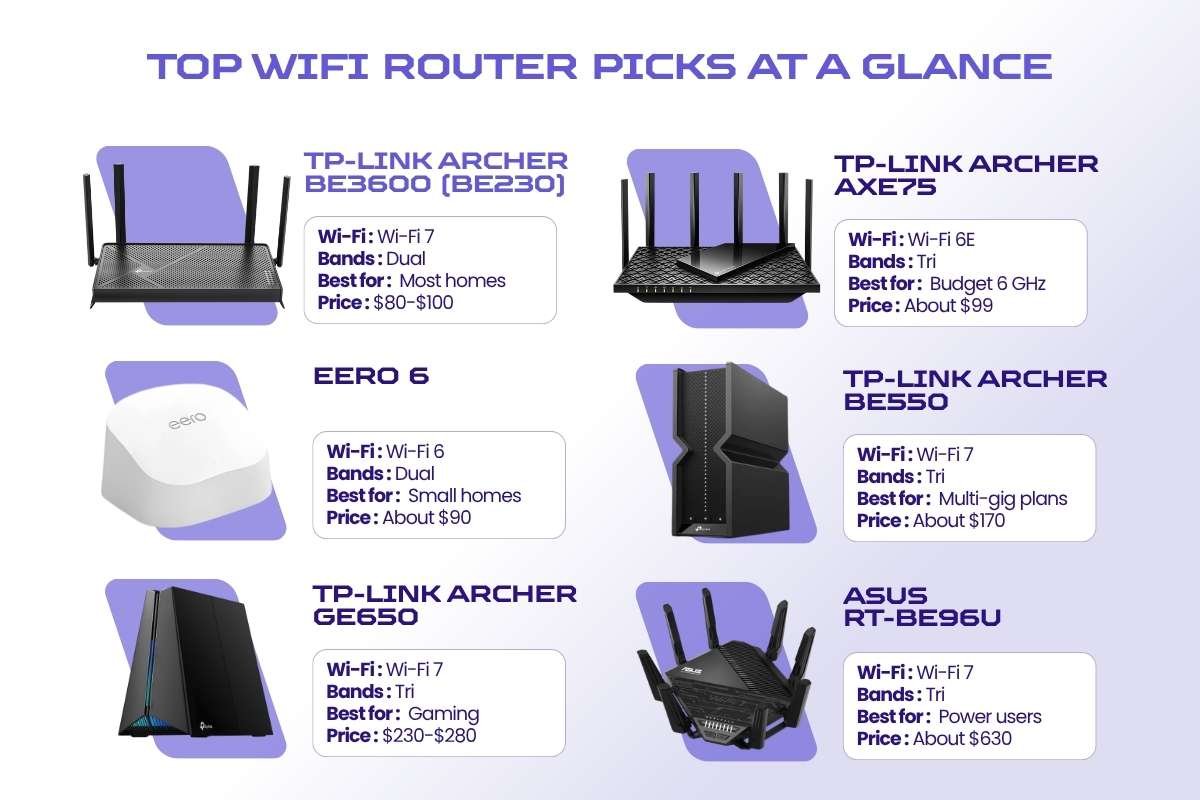
| Router | Wi-Fi | Bands | Best for | Price |
| TP-Link Archer BE3600 (BE230) | Wi-Fi 7 | Dual | Most homes | $80-$100 |
| TP-Link Archer AXE75 | Wi-Fi 6E | Tri | Budget 6 GHz | About $99 |
| Eero 6 | Wi-Fi 6 | Dual | Small homes | About $90 |
| TP-Link Archer BE550 | Wi-Fi 7 | Tri | Multi-gig plans | About $170 |
| TP-Link Archer GE650 | Wi-Fi 7 | Tri | Gaming | $230-$280 |
| Asus RT-BE96U | Wi-Fi 7 | Tri | Power users | About $630 |
| TP-Link Archer BE900 | Wi-Fi 7 | Quad | Top speed, wired ports | Premium |
| eero Pro 7 | Wi-Fi 7 mesh | Tri | Large homes | $600-$800 |
| eero 6+ (3-pack) | Wi-Fi 6 mesh | Dual | Budget mesh | About $215 |
*Prices come from the reviews and change often, so check current listings before you buy.
How to Choose the Best WiFi Router for Your Needs?
Start with your needs, and then match them to a router.
- Check your internet speed. A 300 Mbps plan does not need a top-end model.
- Measure your space. Small homes need one router, while big homes may need mesh.
- Count your devices. Many devices call for a tri-band router.
- Look at the ports. Choose 2.5G or faster ports for a NAS or a multi-gig plan.
- Check your devices. Wi-Fi 7 only helps if your phone or laptop supports it.
- Set a budget. About $130 buys great performance, entry-level Wi-Fi 6 costs $50 to $100, and top gaming models can reach $700.
- Add the extras. Look for parental controls, QoS, a guest network, and a USB port.
The best wifi router depends less on the biggest number on the box than on your home and your habits.
Real-World Performance Considerations
Box speeds are lab numbers, and real speeds are lower. Distance, walls, and busy neighbors all cut speed.
Lag matters too, because a good router stays quick when many people are online. The 6 GHz band is fast, but it has a short range, and FCC limits also cap its power. Your internet plan sets the top speed, so even the best wifi router cannot beat it.
Wired links stay faster and steadier than wireless ones, so use Ethernet for desktops, consoles, and TVs when you can. Place your router high, in the open, and near the center of your home.
Secure Your Signal: What to Know Before You Plug In
Even the best wifi router needs safe settings, because a fast router with weak security is still a risk.
- Use WPA3: All the top picks support WPA2 and WPA3, so choose WPA3, or mixed mode if you have older devices.
- Keep firmware current: Enable automatic updates so that security holes are closed as they are found. Eero updates itself by default.
- Change default logins: Create a strong administrator password and a unique Wi-Fi password.
- Use a guest network: Visitors get internet access, but they cannot reach your files or printers.
- Turn off what you do not use: WPS is convenient, but a strong password is safer.
- Check for subscriptions: TP-Link charges for advanced parental controls and Security+, and eero charges for some security tools, while the Asus RT-BE96U includes free ones.
- Know the login rules: Some apps need an online account, so read the privacy terms first.
Mesh Wi-Fi: Is It Right for You?
A mesh system uses a main router plus one or more satellites, which are also called nodes. They work together as one network with one name, so your phone moves between units without dropping the connection. Depending on the number of nodes, a mesh system can cover 4,000 to 6,000 square feet.
When mesh helps:
- Your home is over 2,300 square feet or has more than two floors.
- Thick walls block the signal from reaching some rooms.
- You have dead zones in a garage, yard, or basement.
A simple rule: If you have thought about adding an extender to a good router, buy a mesh system instead. Sometimes a mesh kit is the best wifi router choice even when a single unit looks faster on paper.
Mesh vs Range Extenders
An extender picks up your signal and repeats it, but the repeated signal is often about half as strong. Many extenders also create a second network, which makes roaming through the house harder. Mesh avoids both problems.
What is Wi-Fi 7? How Does It Compare with Wi-Fi 6/6E?
Wi-Fi 7 is the newest Wi-Fi standard, and its technical name is 802.11be. It is designed to deliver faster speeds and lower lag in busy homes, so the best wifi router for many buyers in 2026 now supports it. Wi-Fi 7 routers are easy to find today, and prices have dropped a lot.
Here are the key features that make Wi-Fi 7 different:
- 6 GHz band: This band is less crowded than 2.4 GHz and 5 GHz, and it works best at short range.
- 320 MHz channels: Wider channels can move much more data at the same time.
- 4K QAM: This technology packs more data into every signal.
- MLO (Multi-Link Operation): A device can use two bands at once for a steadier connection.
- Multi-RU puncturing: The router can still use the free parts of a crowded channel.
In theory, Wi-Fi 7 can reach speeds up to 40 Gbps, but real speeds are far lower. Your phone or laptop must also support Wi-Fi 7 to get the full benefit, while older devices still work at their own top speed.
Wi-Fi 6/6E vs Wi-Fi 7
Here’s how Wi-Fi 7 compares with Wi-Fi 6/6E:
| Feature | Wi-Fi 6 | Wi-Fi 6E | Wi-Fi 7 |
| Standard | 802.11ax | 802.11ax | 802.11be |
| Bands | 2.4 and 5 GHz | 2.4, 5, and 6 GHz | 2.4, 5, and 6 GHz |
| Channel width | Up to 160 MHz | Up to 160 MHz | Up to 320 MHz |
| MLO | No | No | Yes |
| Best for | Everyday homes | Crowded homes with newer devices | Fast plans and many devices |
| Price | Lowest | Middle | Higher, but falling |
Wi-Fi 6 is still the most widely used standard, and it handles busy networks well. Wi-Fi 6E adds the clean 6 GHz band, while Wi-Fi 7 adds wider channels and MLO for steadier links. Most people should buy a Wi-Fi 6 or Wi-Fi 7 router in 2026.
Conclusion
With the best wifi router in your home or office, you can enjoy buffer-free, high-speed internet right now. Nobody likes interruptions, so it is time to say no to loading and waiting. Wi-Fi 7 has made 2026 a great year to upgrade.
The TP-Link Archer BE3600 fits most homes, the Asus RT-BE96U suits power users, and the TP-Link Archer AXE75 is a solid low-cost pick, while mesh systems like the eero Pro 7 help large homes. Match the router to your space, your speed, and your devices, and then set it up with strong security.
Frequently Asked Questions
1. Is Wi-Fi 7 worth it in 2026?
Yes, for most homes with fast internet or many devices.
2. Do I need a Wi-Fi 7 router for gigabit internet?
No, a good Wi-Fi 6 or 6E router handles gigabit speeds well.
3. Is mesh better than a single router?
Mesh suits large homes, while a single router is often the best wifi router for small spaces.
4. How many devices can a Wi-Fi 7 router support?
Most home models handle dozens of devices, and traffic matters more than the count.
5. What is MLO?
MLO (Multi-Link Operation) lets one device use two bands at once for faster, steadier connections.
Sources:
- https://www.pcmag.com/picks/the-best-wireless-routers
- https://www.rtings.com/router/reviews/best/wifi-router
- https://www.nytimes.com/wirecutter/reviews/best-wi-fi-router/
- https://enterprisewired.com/leadership-in-technology-inspiring-innovation/
- https://www.tp-link.com/in/home-networking/wifi-router/archer-axe75/
- https://rog.asus.com/networking/rog-rapture-gt-be98-pro/
- https://www.asus.com/networking-iot-servers/wifi-routers/asus-gaming-routers/rt-be96u/
- https://www.tp-link.com/in/home-networking/wifi-router/archer-be230/
- https://www.msi.com/Networking/RadiX-AXE6600-WiFi-6E-Tri-Band-Gaming-Router