If you manage a Moodle site, run training through Google Classroom, teach with Canvas Free-for-Teachers, or administer courses in another LMS, you already know that choosing a platform is only the beginning. The real work happens in the details: enrolling learners, organizing SCORM packages, reviewing quiz attempts, fixing broken integrations, and keeping courses accessible across devices.
That is why “free” can be a misleading starting point. Learning Management Systems may have no license fee but still require hosting, storage, upgrades, support, security work, or technical administration. Other platforms offer free educator accounts with limits on users, features, analytics, or integrations.
This guide compares the best free LMS options in 2026 for teachers, instructional designers, training managers, school administrators, and LMS administrators. It explains what each platform does well, where its limits appear, and what you may actually need to budget for.
What is a learning management system?
Learning Management Systems (LMS) are software that helps organizations create, deliver, manage, and track learning.
An LMS can support tasks such as:
- Creating and organizing online courses
- Uploading videos, documents, and other learning content
- Assigning lessons and activities
- Creating quizzes and assessments
- Tracking learner progress
- Managing grades and completion
- Supporting discussions and collaboration
- Connecting with other education and business tools
- Generating learning reports
Schools may use an LMS for classroom learning and remote education. Businesses can use one for employee training, onboarding, compliance programs, and professional development.
Top 6 free learning management systems
We have curated a list of 6 LMS that are free to use. Here is everything you need to know.
1. Moodle
Moodle remains one of the strongest choices for organizations that want an open-source LMS with extensive customization.
Moodle 5.2 is the current stable release line as of August 2026, with Moodle 5.2.2 released in August. The platform can be installed on an organization’s own server and requires a compatible web server, database, and PHP environment.
Best for: Schools, universities, businesses, and organizations needing customization.
Key strengths:
- Open-source platform
- Extensive course management
- Assessments and activities
- Large plugin ecosystem
- Customizable learning environments
- Self-hosting options
- Strong community ecosystem
Watch out for: Moodle itself may be free, but hosting, maintenance, upgrades, security, and technical support can create costs.
2. Canvas free-for-teacher
Canvas offers a Free-for-Teacher account that lets educators create and deliver courses without paying for a standard subscription.
It provides many core Canvas capabilities, making it useful for individual educators who want a polished LMS without managing their own server. However, the free version does not include every feature available in paid Canvas environments.
Best for: Individual teachers and educators.
Key strengths:
- Course creation
- Assignments and assessments
- Mobile access
- Learning analytics
- Familiar Canvas interface
- No software installation for teachers
Watch out for: Free-for-Teacher has feature differences compared with institutional Canvas environments.
3. Google classroom
Google Classroom remains a practical choice in the Learning Management Systems for educators who already use Google Workspace.
Google provides Classroom tools at no cost through Education Fundamentals for qualifying institutions. Paid editions add further capabilities for organizations that need more advanced functionality.
Google’s education offering also includes access to AI tools such as Gemini for Education and Gemini in Classroom at no cost within its stated offering, while advanced capabilities are available through paid editions and selected add-ons.
Best for: Schools, teachers, and institutions using Google Workspace.
Key strengths:
- Simple course management
- Assignment distribution
- Grading tools
- Google Drive integration
- Collaboration through Google Workspace
- Classroom add-ons
- Access to selected AI tools
Watch out for: Google Classroom is designed around the Google ecosystem. Organizations needing highly customized LMS workflows may prefer Moodle or another full LMS.
4. Sakai
Sakai is an open-source learning platform with a strong focus on academic environments.
It provides tools for course management, assignments, assessments, collaboration, and other higher-education workflows.
Best for: Universities and higher-education institutions.
Key strengths:
- Open-source architecture
- Course management
- Assessment tools
- Collaboration
- Academic workflows
- Integration capabilities
- Institutional customization
Watch out for: Organizations may need technical expertise to install, customize, maintain, and support a self-hosted implementation.
5. Chamilo
Chamilo is another open-source option for organizations that want a free LMS without committing to proprietary licensing.
Its current 2.0.3 release was published June 29, 2026, under the GNU/GPLv3+ license.
Best for: Schools, training organizations, and businesses looking for an open-source LMS.
Key strengths:
- Free and open-source software
- Course creation
- Learning activities
- Assessment tools
- Communication features
- Adaptable deployment
Watch out for: Like other self-hosted open-source platforms, implementation can involve hosting and technical administration costs.
6. Claroline connect
Claroline Connect is better described today as a learning experience platform (LXP) rather than simply a conventional LMS. Its current positioning focuses on collaboration, collective intelligence, and adaptable learning experiences.
Best for: Organizations that prioritize collaboration and interactive learning.
Key strengths:
- Collaborative learning
- Social interaction
- Flexible learning experiences
- Hybrid training support
- Adaptable learning environments
Watch out for: Organizations looking for traditional Learning Management Systems may find Moodle or another conventional LMS a better fit.
Free learning management systems comparison
| Platform | Best for | Free model | Open source? | Main strength |
| Moodle | Schools, universities, businesses | Free software | Yes | Customization |
| Canvas Free-for-Teacher | Individual educators | Free educator account | No | Ease of use |
| Google Classroom | Schools and teachers | Free for qualifying institutions | No | Google integration |
| Sakai | Higher education | Open-source software | Yes | Academic workflows |
| Chamilo | Education and training | Free software | Yes | Flexibility |
| Claroline Connect | Collaborative learning | Platform-specific | Yes/open ecosystem | Collaboration |
Comparing Free LMS vs Paid LMS
A free LMS can be the right choice when your needs are simple.
A paid LMS may make more sense when you require advanced administration, dedicated support, complex reporting, stronger enterprise integrations, or large-scale deployment.
| Free LMS | Factor | Paid LMS |
| Low or zero | Initial software cost | Usually paid |
| Varies | Customization | Usually broader |
| Community or limited | Support | Often dedicated |
| May require internal work | Administration | Often more managed |
| Basic to advanced | Analytics | Usually more advanced |
| Varies | Integrations | Usually broader |
| Depends on platform | Scalability | Usually designed for scale |
| May be necessary | Technical expertise | Often less necessary |
The right choice depends on your requirements rather than the price alone.
Hidden costs to consider when choosing a learning management system
Before choosing a free LMS, calculate the total cost of running it.
Consider:
- Web hosting
- Cloud infrastructure
- Domain costs
- Setup and implementation
- Custom development
- Plugins and extensions
- Security monitoring
- Backups
- Maintenance
- Staff training
- Technical support
- Data migration
This matters most with open-source platforms.
For example, downloading Moodle is free, but running it on your own infrastructure requires a compatible server, database, PHP environment, and ongoing administration.
How to choose the right free learning management system? 8 Tips you must know
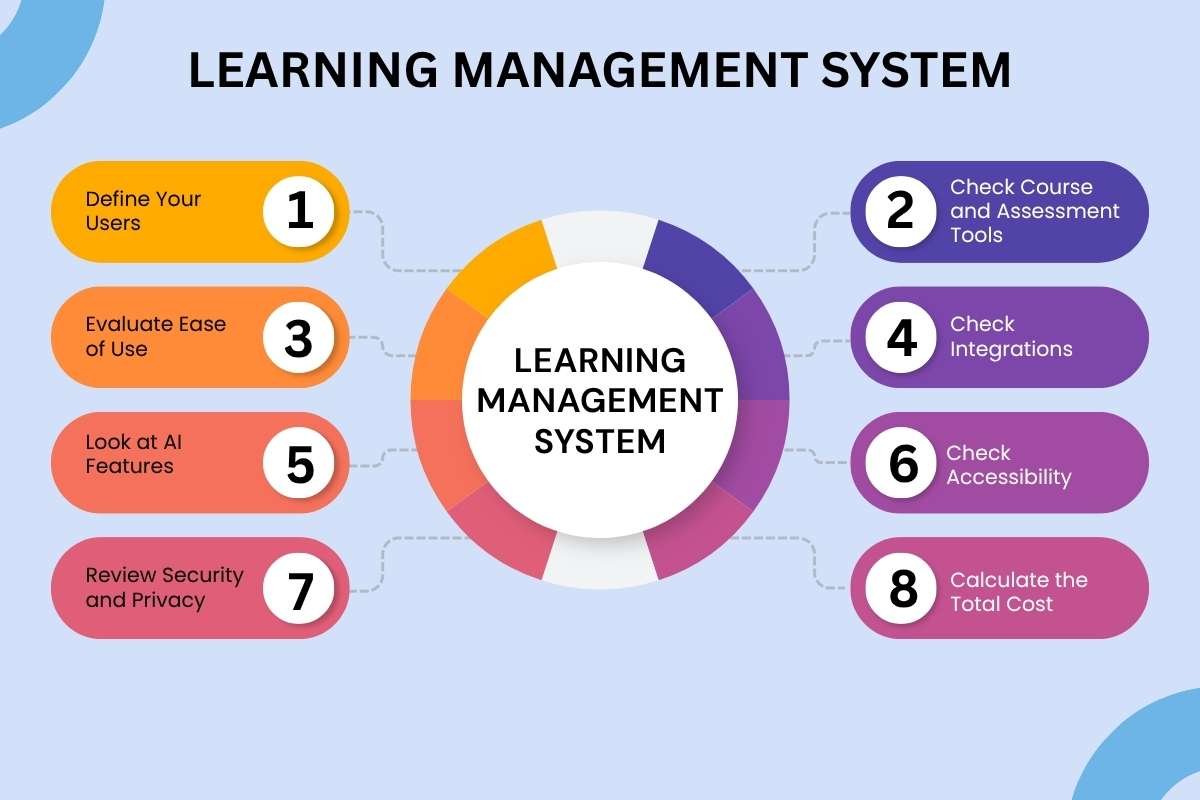
Here are 8 tips you should consider before choosing an LMS.
1. Define your users
Start with the number and type of learners.
An LMS for one teacher and 30 students has very different requirements from one serving thousands of employees.
2. Check course and assessment tools
Ensure the LMS supports the content formats and assessment methods you need, including:
- Videos and documents
- Quizzes and assignments
- Discussion forums
- Certificates
- Learning paths
3. Evaluate ease of use
Test course creation, navigation, grading, reporting, and enrollment to make sure teachers and learners can use the platform comfortably.
4. Check integrations
Confirm that the LMS works with the tools your organization already uses, such as:
- Video meeting platforms
- Productivity tools
- Human resources and student information systems
- Authentication services
- Analytics and reporting tools
5. Look at AI features
Review the platform’s AI tools for content creation, feedback, learner support, and administrative tasks. Check how it handles data, what controls administrators have, and whether advanced features require payment.
6. Check accessibility
Look for accessibility features such as:
- Keyboard navigation and screen-reader support
- Captions and transcripts
- Accessible documents
- Clear navigation
- Adjustable text and display options
7. Review security and privacy
Check authentication, permissions, encryption, backups, audit logs, data retention, data residency, privacy policies, integrations, and applicable data-protection requirements.
Organizations operating in India should also consider their obligations under applicable Indian data-protection laws.
8. Calculate the total cost
Do not compare platforms only by their subscription price.
Ask what you will spend on hosting, maintenance, support, integrations, training, and upgrades over time.
Who should use a free LMS?
Free LMS platforms can work particularly well for:
- Individual educators
- Tutors
- Small schools
- Small training programs
- Nonprofits
- Startups
- Small businesses
- Teams testing online learning
A paid LMS may be a better fit for:
- Large enterprises
- Large universities
- Organizations with complex compliance needs
- Teams requiring dedicated technical support
- Organizations needing advanced analytics
- Businesses requiring extensive HR or business-system integrations
Conclusion
The best free learning management system depends on what you need to teach, who will use it, and how much technical work your organization can manage.
Moodle and Chamilo offer strong open-source flexibility. Canvas Free-for-Teacher provides an accessible option for individual educators. Google Classroom works particularly well within the Google ecosystem, while Sakai suits many higher-education environments. Claroline Connect is worth considering for collaborative learning experiences.
The key is to look beyond the word free. Compare features, user limits, integrations, accessibility, security, AI capabilities, support, and total operating costs before choosing an LMS. A free platform can be an excellent starting point, but the right platform is the one that fits your learning goals and can support them as they grow.
Frequently asked questions
1. What are the best free Learning Management Systems in 2026?
There is no single best option for everyone. Moodle is a strong choice for customization, Canvas Free-for-Teachers works well for individual educators, and Google Classroom suits institutions already using Google Workspace.
2. Is Moodle completely free?
Moodle is open-source software that can be downloaded and installed without a software license fee. However, hosting, implementation, maintenance, security, and support can still cost money. Moodle’s current stable branch is 5.2 as of August 2026.
3. Is Canvas LMS free?
Canvas offers a Free-for-Teacher account for educators. However, it does not include every feature available in paid Canvas environments.
4. Is Google Classroom free?
Google Classroom tools are available at no cost through Google Workspace for Education Fundamentals for qualifying institutions. Additional features are available through paid editions.
5. Is Edmodo still available?
No. Edmodo shut down its free B2C version on Sept. 22, 2022. It should therefore not be included in a current list of free LMS platforms.