AI has moved beyond experiments and into daily business work. Nearly 9 in 10 organizations now report regular AI use in at least one business function, while 44% say they are scaling AI across the enterprise.
Now the question is where AI can solve a real problem, which tool fits that job, and how to use it without creating new costs or risks.
This article looks at AI tools for business across four practical use cases: writing, analytics, customer service, and automation. It also compares current pricing, explains how to choose a tool, and lays out a simple way to adopt AI without turning every team into a technology experiment.
How did we pick these AI tools for business?
A long list of AI products is not very useful if it does not help you decide what to buy. We selected tools based on their business use case, current availability, integrations, pricing clarity, scalability, and ability to solve a specific workplace problem.
We also looked for products with established business offerings rather than tools built mainly for individual experimentation. Pricing and features can change, so the table below reflects publicly listed pricing available.
Which AI tools for business work best for different needs?
The best way to compare AI tools for business is by the job they need to perform.
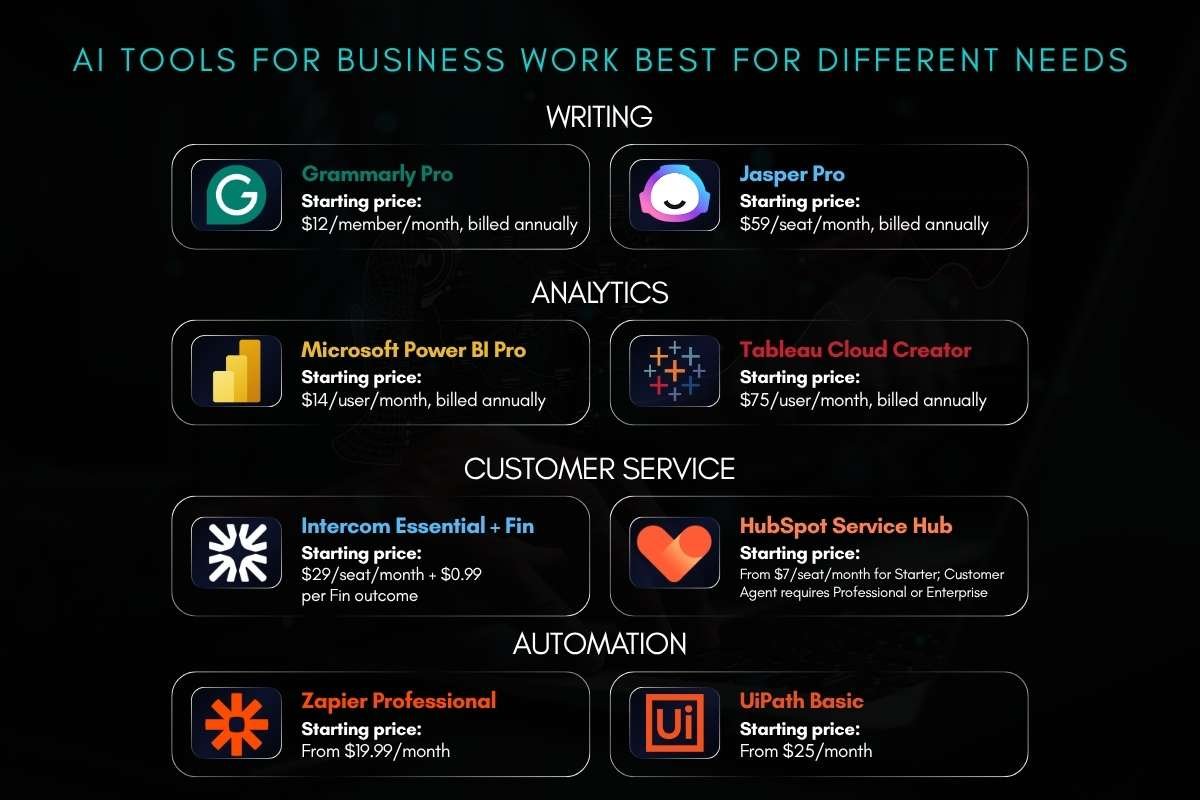
| Use case | AI tools | Starting price* |
| Writing | Grammarly Pro | $12/member/month, billed annually |
| Jasper Pro | $59/seat/month, billed annually | |
| Analytics | Microsoft Power BI Pro | $14/user/month, billed annually |
| Tableau Cloud Creator | $75/user/month, billed annually | |
| Customer service | Intercom Essential + Fin | $29/seat/month + $0.99 per Fin outcome |
| HubSpot Service Hub | From $7/seat/month for Starter; Customer Agent requires Professional or Enterprise | |
| Automation | Zapier Professional | From $19.99/month |
| UiPath Basic | From $25/month |
*Prices are vendor-listed starting prices and can change by region, billing cycle, usage, taxes, or plan. Check the vendor before purchasing.
Now, let’s look at the eight AI tools for business that stand out across these four use cases.
Writing: What can these tools handle?
Writing tools can help teams draft, edit, summarize, rewrite, and maintain a consistent brand voice. They work well for marketing teams, sales teams, HR departments, and employees who spend a large part of their day writing emails, reports, proposals, or other business content.
1. Grammarly Pro:
It works best when the problem is the quality and consistency of everyday business communication.
Teams can use it for emails, reports, proposals, presentations, and customer-facing copy, with features such as full-sentence rewrites, tone adjustments, style guides, brand tones, snippets, and team analytics. Pro supports up to 149 members and includes 2,000 AI prompts per member.
Best fit: Teams that already write across tools such as Google Docs, Microsoft Word, Outlook, Slack, Salesforce, or Zendesk and want consistent writing without moving everything into a separate AI workspace.
2. Jasper Pro:
It is more useful for marketing teams producing content at scale. It is designed around marketing workflows and brand-focused content, so it can support campaign copy, website content, social posts, and other branded material.
Best fit: Marketing departments that need repeatable content production and stronger control over brand voice.
Analytics: Which tools help turn business data into decisions?
Analytics tools help businesses turn operational data into reports, dashboards, and decisions.
3. Microsoft Power BI Pro:
It is a practical choice for companies already working heavily with Microsoft products. Teams can use it to build dashboards and reports, combine business data, and track measures such as sales, revenue, costs, customer activity, and operational performance.
Best fit: Businesses that want reporting connected to their existing Microsoft data environment rather than adding a separate analytics stack.
4. Tableau Cloud Creator:
This tool is built for teams that need deeper data visualization and business intelligence. Creator includes Tableau Desktop, Tableau Prep Builder, web authoring, and Tableau Pulse, allowing analysts to prepare data, build visualizations, and share findings with other users.
Best fit: Analytics teams that need flexible visual analysis and dashboards for different business teams.
Customer service: Where can AI reduce support workload?
Customer service tools are useful when teams face large volumes of similar questions. They can answer routine requests, search approved information, summarize conversations, and send complex cases to human agents.
5. Intercom fin:

It can handle customer conversations and resolve common questions, while human agents take over when a case needs escalation.
Its pricing is tied to successful outcomes, which means businesses should track both resolution volume and cost per resolution when measuring its value.
Best fit: Support teams dealing with a high volume of repeat questions about products, accounts, orders, or basic troubleshooting.
6. HubSpot customer agent:
It works across channels such as chat, email, forms, and calling and can escalate conversations to human teams. It is particularly useful when customer service already runs through HubSpot because customer information and support activity remain within the same platform.
HubSpot currently reports that its Customer Agent resolves 65%+ of conversations automatically, although businesses should validate performance against their own support data.
Best fit: HubSpot users who want to add AI support without introducing a separate customer-service system.
Automation: Which tools can remove repetitive work?
Automation tools connect applications and reduce the need for people to move information manually between systems. This can include sending a lead from a form to a CRM, creating a support ticket, updating a spreadsheet, or routing an approval.
7. Zapier Professional:
It is useful when employees repeatedly move information between separate business applications. For example, a new form submission can trigger a CRM update, create a task for a sales representative, and send a notification without someone handling each step manually.
Best fit: Small and midsize teams looking for no-code automation between existing apps.
8. UiPath Basic:
It is better suited to structured, repeatable business processes that require more than simple app connections. It can support robotic process automation where defined rules determine what the system should do.
Best fit: Businesses with repetitive processes across finance, operations, HR, or other back-office functions that need more structured automation.
How should you choose the right AI tool for your business?
Buying an AI tool because it is popular can create another unused subscription. Start with the business problem instead.
Use this five-step filter:
- Define the task. Write down exactly what employees need the tool to do.
- Check your existing stack. Look for features already included in software you pay for.
- Review data requirements. Identify what information the tool needs and where that data will go.
- Test the workflow. Run a small pilot with real but controlled business tasks.
- Measure the result. Track time saved, cost, quality, revenue, resolution rate, or another metric tied to the original problem.
Security should be part of the buying decision, not a later check. Review data retention, access controls, encryption, administrator settings, integration permissions, and whether the vendor uses customer data to train its models.
For organizations building a broader AI program, the NIST AI Risk Management Framework provides a voluntary structure for managing AI risks across design, development, deployment, and use. Its Generative AI Profile adds guidance for risks specific to generative AI.
What are the challenges of implementing AI tools for business?
Choosing an AI tool is easier than integrating it into everyday business processes. The main challenges are:
- Poor data: Incomplete, outdated, or inconsistent customer, financial, or operational data can produce unreliable AI outputs.
- Disconnected systems: Adding too many AI tools can create a fragmented tech stack. IBM found that 50% of surveyed CEOs said rapid AI investment had left their organizations with disconnected technology.
- Unclear employee rules: Set clear rules for what employees can enter into AI tools, which tasks require human review, and who is responsible for the final output.
- Rising usage costs: Check how each vendor charges. Costs may depend on seats, credits, tasks, or AI outcomes, so compare expected usage with the actual monthly cost.
- Compliance requirements: Businesses operating in the EU must account for the AI Act. Its Article 50 transparency requirements apply from August 2, 2026, including rules covering certain AI interactions and AI-generated or manipulated content.
What are the latest AI tools for business trends to watch?

AI is moving beyond simple content generation. The current shift is toward tools that can work inside business systems and complete parts of a workflow.
Microsoft’s 2026 Work Trend Index reported a 15-fold year-over-year increase in active agents in the Microsoft 365 ecosystem, with even larger growth in large enterprises.
Three areas deserve particular attention:
- AI agents: Tools are increasingly able to carry out multi-step tasks rather than only generate text or answer questions.
- AI-assisted analytics: Business users can interact with data using natural language while still relying on structured reporting and governed data.
- AI inside existing software: AI is increasingly being built into CRM, productivity, analytics, customer service, and automation platforms rather than operating as a separate application.
The next phase will be about deciding which work should be assisted, automated, or kept fully human.
The businesses that gain the most will likely be those that connect AI to good processes, reliable data, strong controls, and measurable goals rather than treating AI as a standalone purchase.
Conclusion
AI tools for business can save time, support better decisions, improve customer service, and automate routine work. But the tool itself is only part of the equation.
Start with a clear business problem, compare tools against your existing systems, test before scaling, and measure the result. The best AI investment is not the tool with the longest feature list. It is the one that solves a real business problem at a cost and risk the company can manage.
FAQs
1. Can small businesses afford AI tools for business?
Yes. Many business AI tools offer free or low-cost plans, while paid options can scale with users or usage. Small businesses can start with a single workflow instead of buying a large platform.
2. How long does it take to implement an AI tool?
Simple writing or productivity tools can be introduced in days, while analytics, customer service, and automation projects may take weeks or longer because they require integrations, testing, and training.
3. Should businesses build their own AI tools or buy them?
Buying is usually faster for common tasks such as writing, analytics, support, and workflow automation. Building makes more sense when a company has unique data, processes, or requirements that existing products cannot handle well.
4. How can a business calculate AI tool ROI?
Compare the tool’s total cost with measurable gains such as hours saved, lower support costs, faster response times, higher conversion, or fewer manual errors.
5. What should a business include in an AI tool policy?
A basic policy should cover approved tools, restricted data, human review, security requirements, ownership of outputs, and rules for customer-facing or high-impact decisions.