Setting up a workspace that keeps you feeling energized throughout the day often comes down to the equipment supporting your body. When your posture receives continuous support, long focus sessions feel remarkably smooth and comfortable.
Finding a design that fits your unique body shape makes a massive difference in daily physical well-being. Investing in high-quality computer office chairs gives professionals targeted lumbar support, breathable materials, and full adjustability to maintain alignment. Upgrading your daily seat helps prevent muscle strain so you can tackle tasks without physical distraction.
Computer office chairs, also known as ergonomic chairs or task chairs, are specially designed to provide support and comfort during extended periods of sitting, particularly at a desk or computer workstation. Unlike traditional chairs, which may lack adjustable features and proper lumbar support, these chairs prioritize ergonomics to promote good posture and reduce the risk of musculoskeletal issues such as back pain and neck strain.
These chairs typically feature adjustable seat height, armrests, lumbar support, and recline mechanisms, allowing users to customize their seating position for optimal comfort and support. Additionally, they often incorporate breathable materials and ergonomic design elements to enhance airflow and prevent discomfort, even during prolonged use.
So, now let us take a look at some of the best chairs for your office!
Top 10 computer office chairs for comfortable workdays
Choosing a computer office chair is about more than finding a comfortable place to sit. The right chair should support your posture, adjust to your body, and remain comfortable through long work sessions. The chairs below offer different combinations of support, adjustability, and design to suit different workspaces and budgets.
1. Herman Miller Aeron Chair
- Key Feature: Pellicle suspension material with adjustable PostureFit SL support
- Best For: Professionals who spend long hours at a desk
Renowned for its ergonomic design and innovative features, the Herman Miller Aeron Chair is a favorite among office workers and ergonomics enthusiasts. With adjustable lumbar support, breathable mesh upholstery, and a supportive Pellicle suspension system, the Aeron Chair provides unparalleled comfort and support for long hours of sitting.
2. Steelcase Leap Chair

- Key Feature: LiveBack technology that adjusts to your movements
- Best For: Users who want highly customizable ergonomic support
The Steelcase Leap Chair is lauded for its dynamic support and customizable features, making it ideal for users seeking personalized comfort and ergonomic support. With its LiveBack technology, adjustable lumbar support, and intuitive controls, the Leap Chair adapts to the user’s movements and preferences, promoting natural posture and reducing strain.
3. Secretlab Omega Series
- Key Feature: Contoured memory foam cushioning with integrated lumbar support
- Best For: Gamers and professionals who want a hybrid work and gaming chair
Combining sleek design with ergonomic features, the Secretlab Omega Series is a popular choice for gamers and office professionals alike. With its contoured backrest, integrated lumbar support, and memory foam cushions, the Omega Series provides superior comfort and support during extended gaming or work sessions. Plus, its premium upholstery options and customizable design elements add a touch of style to any workspace.
4. IKEA Markus Chair
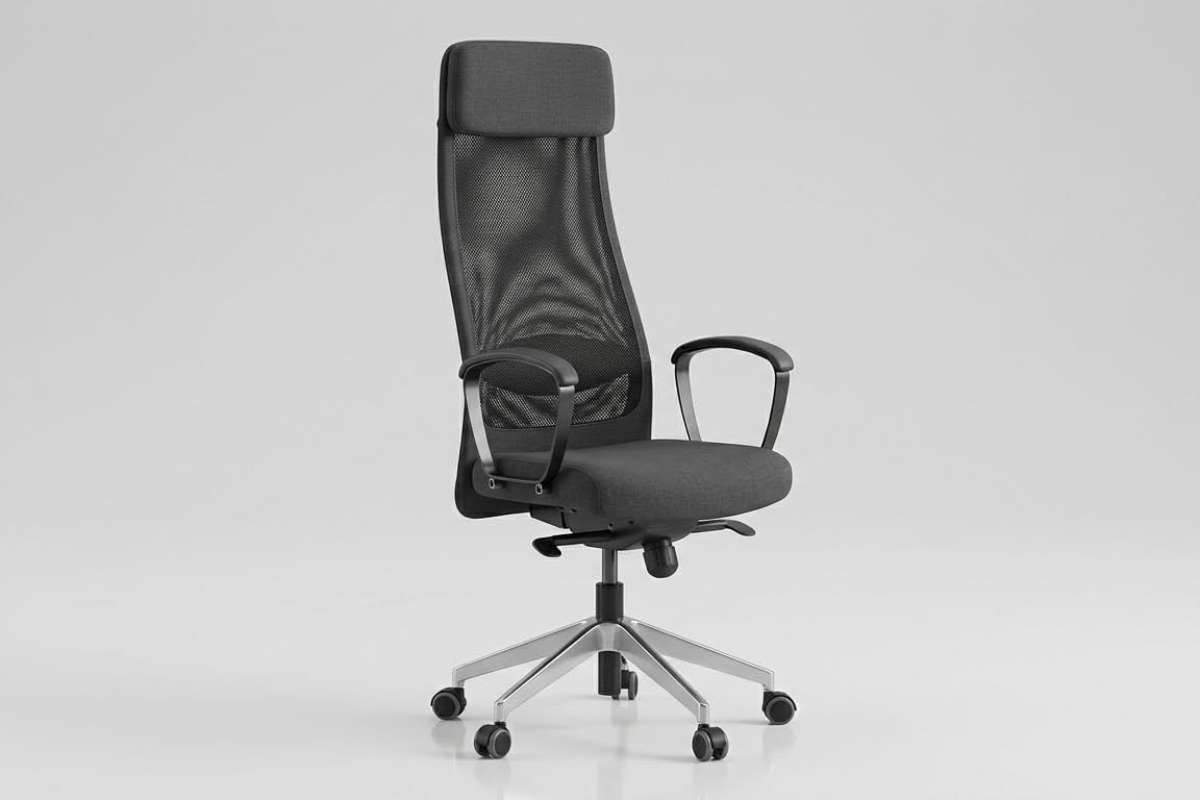
- Key Feature: High backrest with built-in lumbar support and tilt function
- Best For: Budget-conscious users setting up a home or office workspace
Offering affordability without compromising on comfort and functionality, the IKEA Markus Chair is a budget-friendly option for those seeking ergonomic computer office chairs on a tight budget. With its adjustable headrest, lumbar support, and tilt mechanism, the Markus Chair provides customizable comfort for users of all sizes. Its simple yet stylish design makes it a versatile choice for home offices and workspaces.
5. HON Ignition 2.0 Chair
- Key Feature: Adjustable lumbar support with synchro-tilt functionality
- Best For: Office workers looking for affordable, adjustable ergonomic support
Designed with versatility and comfort in mind, the HON Ignition 2.0 Chair features a range of adjustable features and ergonomic design elements to accommodate a variety of users and tasks. With its breathable mesh back, adjustable lumbar support, and synchro-tilt mechanism, the Ignition 2.0 Chair promotes proper posture and reduces fatigue during long hours of sitting.
6. Steelcase Gesture Chair

- Key Feature: 360-degree adjustable arms with LiveBack support
- Best For: Professionals who need flexible support across different working positions
Designed around the way people naturally move while working, the Steelcase Gesture Chair combines flexible support with extensive adjustability. Its 360-degree arms, LiveBack technology, and adjustable seat and recline settings allow users to maintain comfortable positions while switching between tasks. The chair is particularly useful for modern workstations where users frequently shift between computers, phones, and other devices.
7. Haworth Fern Chair
- Key Feature: Flexible Wave Suspension System with adjustable lumbar support
- Best For: Professionals seeking adaptive back support for long work sessions
The Haworth Fern Chair uses its Wave Suspension System to adapt to the user’s movements while providing support from the upper back through the lumbar and pelvic areas. Its flexible backrest, adjustable lumbar support, synchronized tilt, and forward-tilt option allow users to personalize their sitting position. It secures a spot on this list of the best computer office chairs due to its edgeless design, which encourages movement and helps distribute pressure during extended periods at a desk.
8. Branch Ergonomic Chair

- Key Feature: Seven points of adjustment with breathable mesh backrest
- Best For: Home office users seeking ergonomic support at a mid-range price
The Branch Ergonomic Chair combines a breathable mesh back with adjustable lumbar support, seat depth, armrests, and recline settings. Its design focuses on providing essential ergonomic features without reaching the price of premium office chairs. The balanced combination of adjustability, comfort, and clean styling makes it a practical option for professionals building a comfortable home office or upgrading their everyday workspace
9. Steelcase Series 2 Chair
- Key Feature: Air LiveBack support with adjustable lumbar and 4D arm options
- Best For: Professionals looking for strong ergonomic support at a mid-range price
The Steelcase Series 2 combines a flexible backrest with adjustable support for different working positions. Its Air LiveBack technology responds to movement, while the adjustable seat depth, lumbar support, recline, and arms help users create a more personalized fit. It offers a practical balance of comfort, adjustability, and durability for everyday office work.
10. Haworth Soji Chair

- Key Feature: Height-adjustable lumbar support with synchronized tilt and 4D arms
- Best For: Professionals who want extensive adjustability for all-day work
A highly adjustable design makes the Haworth Soji suitable for different body types and working styles. It includes adjustable lumbar support, seat depth, 4D arms, forward tilt, and a waterfall seat edge to reduce pressure on the legs. Its breathable mesh and durable construction also make it a strong choice for busy home or professional workspaces.
Also read: The Backbone of Modern Technology: Understanding Computer Information Systems and Their Benefits
What are the key features to consider for computer office chairs?
A good office chair should work with your body rather than forcing you into one fixed position. While appearance and price may influence your choice, ergonomic support, adjustability, comfort, and build quality have a greater impact on everyday use. These key features can help you compare different chairs and find one that fits your working needs.
1. Ergonomic design
When evaluating computer office chairs, prioritize those with ergonomic design features that promote proper posture and provide adequate support for the spine, neck, and lower back. Look for chairs with adjustable lumbar support, contoured seat cushions, and adjustable armrests to accommodate different body types and preferences.
2. Adjustability
Opt for chairs that offer a high degree of adjustability to cater to individual preferences and work requirements. Key adjustable features to look for include seat height, seat depth, armrest height and width, backrest recline angle, and lumbar support position. The ability to customize these settings ensures a comfortable and ergonomic seating experience tailored to your specific needs.
3. Comfort
Comfort is paramount when choosing a computer office chair, as it directly impacts productivity and well-being during long hours of use. Look for chairs with ample padding, breathable upholstery materials, and supportive cushioning to prevent fatigue and discomfort. Consider factors such as seat width and depth, as well as the firmness of the cushioning, to ensure optimal comfort throughout the day.
4. Durability and build quality
Invest in a chair that is built to last, with durable materials and construction that can withstand daily use over an extended period. Quality components such as sturdy frames, robust casters, and premium upholstery contribute to the longevity and reliability of the chair. Additionally, consider factors such as warranty coverage and customer reviews to gauge the durability and overall satisfaction with the product.
5. Style and aesthetics
While functionality and comfort are paramount, the aesthetic appeal of the chair should also be considered, especially in office environments where visual aesthetics play a role. Choose a chair that complements the overall design aesthetic of your workspace, whether it’s a sleek modern design, a classic executive style, or a more ergonomic-focused look.
After comparing these factors, you can narrow your options based on the features that matter most to you. Computer office chairs with the right combination of support and adjustability can make long hours at your desk more comfortable and help create a better working environment.
Conclusion
Choosing the right desk chair transforms your daily work experience by protecting your posture and keeping your energy high throughout long sessions. Prioritizing computer office chairs with dynamic lumbar support, breathable mesh materials, and customizable adjustments eliminates physical strain before it impacts your focus.
Investing in human-centered workspace furniture pays immediate dividends in your daily health and productivity. Upgrading your seating setup builds a comfortable, highly supportive environment where you can perform at your best every day.
FAQs
1. What features matter most in ergonomic computer office chairs?
Look for adjustable lumbar support, height-adjustable armrests, a breathable mesh backrest, and a smooth tilt-recline mechanism to maintain healthy spine alignment.
2. How do I know if my office chair is adjusted correctly?
Your feet should rest flat on the floor with your knees bent at a 90-degree angle, while your lower back rests firmly against the lumbar cushion.
3. Is a mesh office chair better than a leather office chair?
Mesh chairs offer superior airflow and breathability for long sitting hours, whereas leather chairs provide plush cushioning but retain more heat over time.