What can you do about the constant increase in physical assets it takes to run and manage a network system?
Expanding a traditional network often means buying new hardware, scheduling complex installations, and waiting through long deployment cycles. Every added firewall, router, or load balancer requires physical equipment, higher costs, and ongoing maintenance. As traffic grows and services multiply, scaling the network becomes expensive and slow.
Network Functions Virtualization (NFV) addresses this challenge by replacing dedicated hardware with software-based network functions that run on standard servers. For organizations handling cloud workloads, 5G, or large-scale data traffic, NFV delivers flexibility, faster rollouts, and a more efficient way to operate modern networks.
But what exactly is NFV? Let us find out.
What is Network Functions Virtualization?
NFV is a method that runs network services as software instead of physical devices. In the past, companies used separate hardware for each task. One device handled routing. Another managed firewalls. A third balanced traffic. This setup costs more and takes time to scale.
Now, companies run these services on standard servers in data centers. They install software instead of buying new hardware. This shift reduces cost and speeds up deployment.
For example, a telecom company that wants to add a firewall no longer needs to ship hardware to every site. It installs firewall software on existing servers. The service goes live much faster.
To understand this model, you need to know its core components.
1. Virtual Network Functions
Virtual Network Functions, or VNFs, are software versions of network devices. They replace physical routers, firewalls, and load balancers.
A bank, for instance, can run a firewall VNF in a central data center. All branch traffic passes through this software. The bank avoids placing hardware in every office. Each VNF runs inside a virtual machine or container. It behaves like a real network device but runs on shared hardware.
2. NFV Infrastructure
In any Network Functions Virtualization deployment, NFVI provides the physical foundation that supports all virtual services. It includes physical servers, storage, and networking hardware. It also includes the virtualization layer.
This layer divides one physical server into many virtual machines. Each machine runs a different VNF. The system uses hardware more efficiently.
For example, one server can host both a routing VNF and a firewall VNF at the same time.
3. Virtualization Layer
The virtualization layer manages virtual machines or containers. It assigns CPU, memory, and storage to each VNF. A hypervisor often controls this layer. It keeps each VNF separate. If one fails, the others continue to run. Containers are also common. They start quickly and use fewer resources.
4. Management and Orchestration
Management and orchestration control the full system. It deploys, monitors, and scales VNFs. If network traffic increases, the system creates more VNF instances. When traffic drops, it removes them. This process runs automatically.
For example, during a large event, mobile traffic may spike. The system responds by launching more virtual routers.
5. Support Systems
Support systems handle billing and service tracking. They connect network operations with business tasks. When a company launches a new service, these systems record usage and manage customer data.
Together, these components create a flexible, software-driven network. Companies can launch services faster and adapt to demand with ease.
How Does Network Functions Virtualization Work?
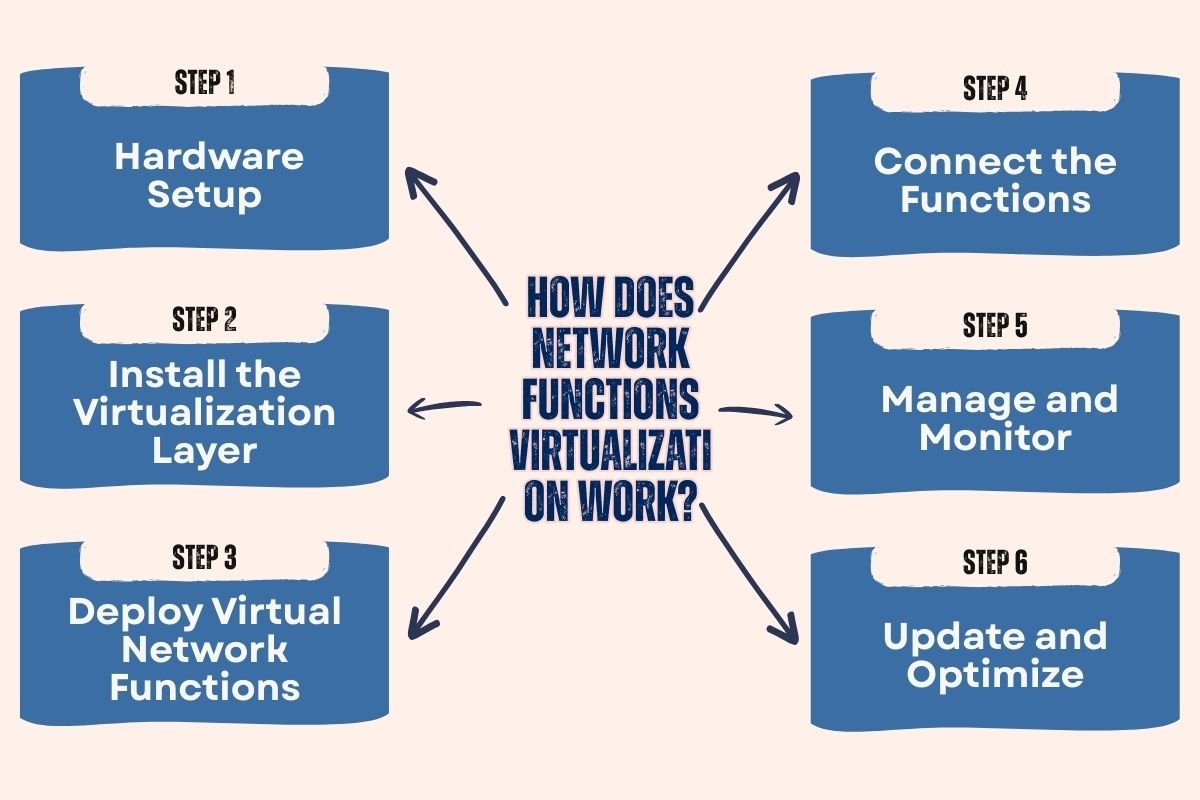
This model shifts network tasks from hardware to software. It runs services on virtual machines or containers inside a data center. This hardware abstraction is a defining characteristic of such environments. Each service works as an independent software unit.
Let us break the process into clear steps.
Step 1: Hardware Setup
The first step in Network Functions Virtualization is setting up the hardware. The company sets up physical servers, storage, and networking equipment in a data center. These servers act as the base platform. They provide CPU, memory, and storage resources.
For example, a telecom provider installs high-performance servers in one central location. These servers will host multiple network services.
Step 2: Install the Virtualization Layer
Next, the team installs a hypervisor or container platform. This layer creates virtual machines or containers on each server. It divides hardware resources among them.
Each virtual machine acts like a separate computer. It can run its own operating system and software. Containers work in a similar way but use fewer resources.
Step 3: Deploy Virtual Network Functions
Engineers then install software-based network functions inside these virtual environments. These include routers, firewalls, and load balancers.
For instance, an online retailer may deploy a virtual load balancer. This software spreads traffic across multiple web servers. It prevents overload during peak sales. Each function runs as a separate instance. The system can create more instances if traffic grows.
Step 4: Connect the Functions
The system links all virtual functions in Network Functions Virtualization. Data flows from one function to another in a defined path.
This path is often called service chaining. For example, incoming traffic may first pass through a firewall. It then moves to a load balancer. Finally, it reaches an application server. The flow happens inside the virtual environment. There is no need for physical cables between devices.
Step 5: Manage and Monitor
A management system oversees the entire setup. It monitors performance and resource use. It also handles scaling. If traffic increases, the system launches new function instances. If demand drops, it shuts down extra ones. This process happens in real time.
For example, during a festival sale, an e-commerce platform may see heavy traffic. The system responds by adding more virtual firewalls and load balancers. Once traffic returns to normal, it reduces them.
Step 6: Update and Optimize
Teams can update software without replacing hardware. They push patches and upgrades directly to virtual functions. This reduces downtime.
If a new security threat appears, the team updates the firewall software. The update rolls out across all virtual instances quickly. Through these steps, companies build a flexible and scalable network. They control services through software. They respond to demand faster and manage resources with precision.
What are the Benefits of Using Network Functions Virtualization?
- 1. Lower Costs: Companies reduce hardware spending and maintenance costs. They run multiple services on standard servers instead of buying separate devices.
- 2. Faster Deployment: Teams launch new services in hours by installing software on existing infrastructure. They avoid long hardware purchase and setup cycles.
- 3. Easy Scalability: Network Functions Virtualization scales based on demand, automatically adjusting virtual resources as traffic fluctuates.
- 4. Better Resource Use: Servers run multiple network functions at the same time. This improves efficiency and reduces waste.
- 5. Improved Innovation: Teams test and deploy new services quickly. They update software without replacing hardware.
- 6. Simplified Management: Centralized tools monitor and control the entire network. Automation reduces manual work and downtime.
- 7. Greater Flexibility: Companies deploy services across data centers or cloud platforms. They place functions closer to users to improve performance.
What is the Difference Between NFV and SDN?
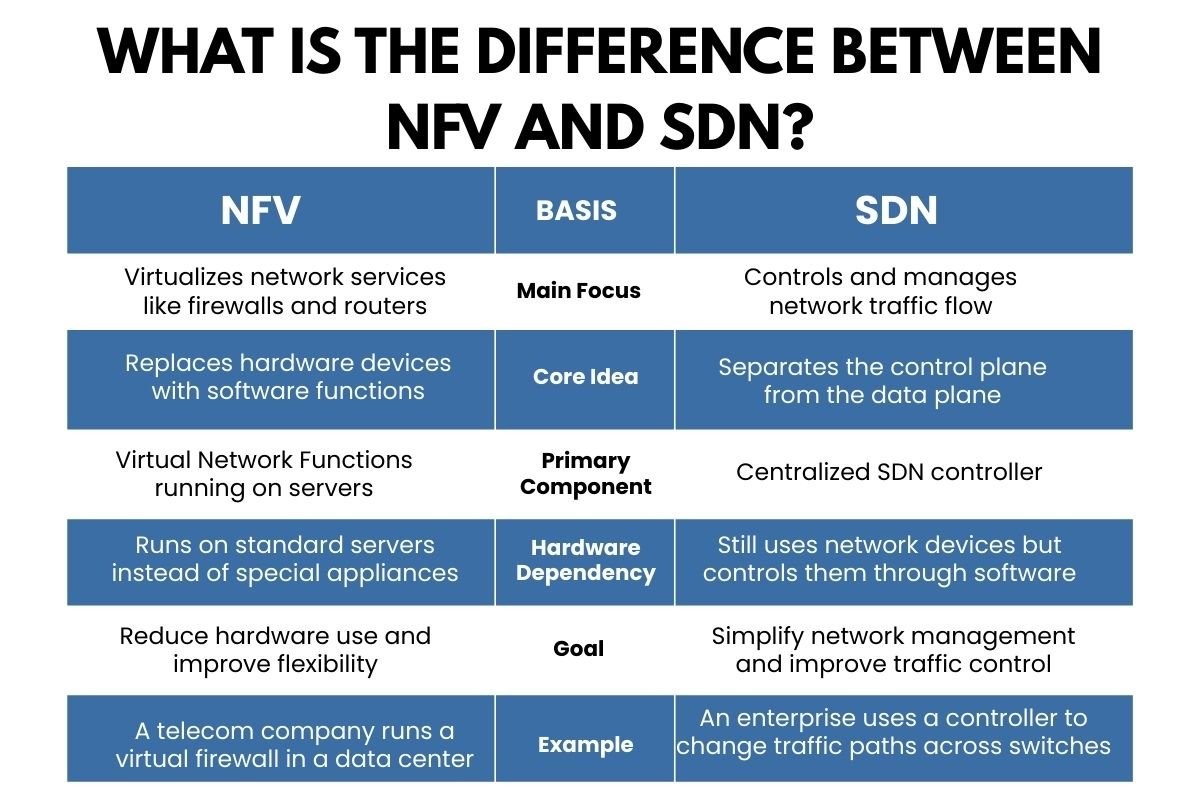
Software Defined Networking is a network approach that separates the control plane from the data plane. The control plane makes decisions about traffic. The data plane forwards the traffic. A central controller manages the network through software.
While both technologies modernize networking, Network Functions Virtualization focuses on service virtualization, whereas SDN concentrates on traffic control architecture.
| NFV | Basis | SDN |
| Virtualizes network services like firewalls and routers | Main Focus | Controls and manages network traffic flow |
| Replaces hardware devices with software functions | Core Idea | Separates the control plane from the data plane |
| Virtual Network Functions running on servers | Primary Component | Centralized SDN controller |
| Runs on standard servers instead of special appliances | Hardware Dependency | Still uses network devices but controls them through software |
| Reduce hardware use and improve flexibility | Goal | Simplify network management and improve traffic control |
| A telecom company runs a virtual firewall in a data center | Example | An enterprise uses a controller to change traffic paths across switches |
Case Study: TGP Telecom Deploys Network Functions Virtualization with Ericsson
TPG Telecom partnered with Ericsson to modernize its mobile core network and prepare for 5G expansion. The company replaced legacy hardware with virtual network functions running on cloud-based infrastructure. This shift gave TPG a flexible and scalable core that could support rapid service growth.
The deployment helped TPG launch new services faster and scale capacity based on real-time demand. It reduced reliance on physical appliances and improved operational efficiency. Ericsson strengthened its cloud native core portfolio in a live 5G environment and showcased automated orchestration at scale.
Key Takeaways:
The NFVI solution enabled about 600 % growth in network capacity while increasing the physical size of the core network by only about 100 %.
The new architecture now runs more than 60 network functions from 10 different vendors on Ericsson’s NFVI.
Conclusion:
Network growth no longer has to mean racks of new hardware and lengthy deployment cycles. Network Functions Virtualization (NFV) gives you the flexibility to scale, adapt, and innovate without being locked into physical infrastructure.
The increase in digital demands has made cloud services, IoT, and 5G agility essential. NFV supports that agility by helping you respond quickly to changing business needs while keeping operational costs under control. For modern enterprises and service providers, virtualization is a smarter way to build and manage networks.
FAQs
1. How does Network Functions Virtualization differ from traditional networking?
Traditional networking relies on specialized hardware for each function, while NFV runs multiple network services as virtualized software on shared infrastructure.
2. Is NFV suitable for small businesses?
Yes. While commonly used by large telecom providers, NFV can also benefit small and mid-sized businesses seeking scalable and cost-efficient network solutions.
3. How does NFV support 5G and cloud environments?
NFV enables rapid deployment and scaling of network services, which is essential for handling dynamic workloads in 5G and cloud-based systems.